

- Analytics
Google Analytics and GDPR Compliance: What You Need to Do
•
 Now that we’re all GDPR experts, let’s talk about how it affects Google Analytics …
GDPR is primarily concerned with data collection as it pertains to user privacy, so Google Analytics — likely the place where you’re storing the most data about your users, even if you don’t realize it — is a great place to start on your roadmap to compliance.
There are essentially two options. One is obtaining explicit consent (not very feasible based on how Google Analytics works) and the other is adjusting your data collection settings in Google Analytics. Luckily, Google has released some tools to help you do the latter.
Now that we’re all GDPR experts, let’s talk about how it affects Google Analytics …
GDPR is primarily concerned with data collection as it pertains to user privacy, so Google Analytics — likely the place where you’re storing the most data about your users, even if you don’t realize it — is a great place to start on your roadmap to compliance.
There are essentially two options. One is obtaining explicit consent (not very feasible based on how Google Analytics works) and the other is adjusting your data collection settings in Google Analytics. Luckily, Google has released some tools to help you do the latter.
Option #1: Obtaining Explicit Consent
According to the GDPR, a publisher needs to obtain “explicit consent” from users at time of data collection — essentially giving them a clear way to opt in (or out). That means you cannot send a request to Google Analytics until AFTER your user has consented to giving you this data, and if they don’t consent, you’ll need to make sure you’re not tracking any of their personal information — including details as basic as IP Addresses — going forward. That means in order to be in compliance, you’d need to first run a consent form before running any Google Analytics tracking code. This method would be ideal, as it would allow you to collect that same level of detail about your users, but it’s definitely the most challenging method. In reality, we don’t think this option is technically feasible for most publishers, so we’re going to focus on working within Google Analytics to help you stop collecting personal information in the first place, and cleaning up data retention to boot.Option #2: Ending Personal Information Collection & Setting Data Retention
The other option is simply not to collect anything related to your users personally, including IP addresses, and making sure you periodically clear out any user data you previously stored. Unfortunately, you won’t have the ability to apply this to EU users alone. Following the steps described here will stop Analytics from collecting personal data across the world. You’ll lose demographic information (if you were collecting that) and some degree of accuracy in other reports. However, based on the simpler implementation, and in the interest of user privacy and GDPR, our opinion is that this is the preferred option at this time.Anonymous IP collection
When you’re browsing the web and send out any request, along with it goes your IP Address, given to you by your ISP. By default, Google records this IP Address with Analytics. IP Addresses are considered personal information by the GDPR because using an IP Address and a time of access is enough, technically, to identify a user from that IP address. Translation: Obtaining and storing this data requires you to obtain consent first — unless you mask or anonymize the IP Address, which will circumvent this issue. IP Addresses are of the format 216.239.32.21. Generally, the first three groups of numbers are enough to determine the country of origin for that particular user. If you drop the last group, or everything after the third dot, you will not be able to track users individually — no further than beyond their country of origin. The bad news is that this requires a code change. The good news is that Google has made it simple with only one line of code that you need to add to the tracking code on your page:ga('set', 'anonymizeIp', true);
ga('send', 'pageview');
Disabling Demographics and Interest Reports
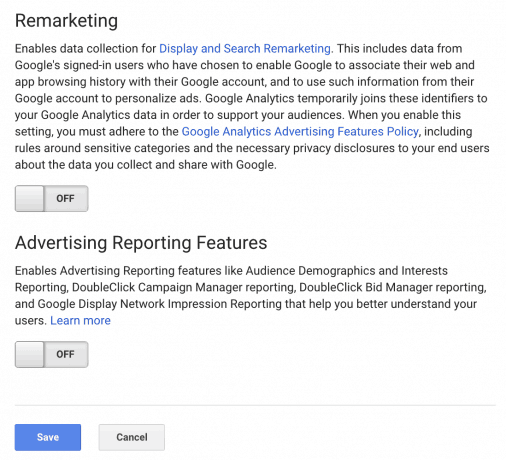
Google Analytics also provides the ability to access to your audience’s demographics — data like gender and age — if you enable the advertising features. This, too, could be considered personal information — and involves tracking based on cookie collection and remarketing data, so if you have it enabled, we suggest turning it off. Again, this will require a code change. If you’re using this feature, you’ll need to remove the following line from your tracking code:ga('require', 'displayfeatures');
Data Retention
So far, so good, but you still have existing data — and data about anonymous users — stored at the individual level at Google, which has added new data retention settings going live May 25 to help publishers stay compliant with GDPR. Luckily, this is an easy one and requires no code change. Simply go to the admin in Google Analytics, find your property, choose “Tracking Info” and select “Data Retention.” For Mediavine’s own websites, we personally left the default setting in place for “User and event data retention,” which is “26 months.” That means after 26 months, any individual user data will be cleared, while the aggregate data about them remains. Translation: You’ll still be able to pull your total pageviews, sessions, etc. for that older archived data, but will lose individual-level data on some reports. We’ve also disabled “Reset on new activity” to make sure if a user returns, the data is still cleared after 26 months. Otherwise, recurring visitor data will never be cleared.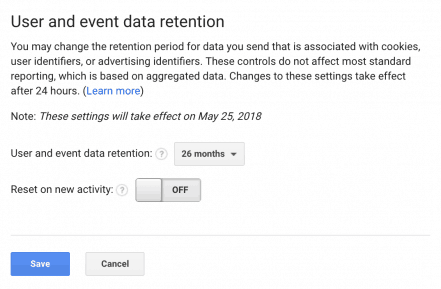
Using WordPress Plugins
If you run WordPress plugins to set up Google Analytics and need to make the Demographic and Anonymous IP Address changes, please consult support forums and help guides from the plugin. If they don’t provide that support, we would recommend reaching out to the plugin author. These are important changes to user privacy that should not go unaddressed.If You Run Global Site Tag or gtag.js
You will need to copy the following code and replace your current gtag code with this code, replacing the UA- numbers with your own. This will place the anonymize and display features code into your tracking.<!-- Global site tag (gtag.js) - Google Analytics -->
<script async src="https://www.googletagmanager.com/gtag/js?id=UA-Your_Number_Here"></script>
<script>
window.dataLayer = window.dataLayer || [];
function gtag(){dataLayer.push(arguments);}
gtag('js', new Date());
gtag('config', 'UA-Your_Number_Here', {'anonymize_ip': true, 'allow_google_signals': false, 'allow_ad_personalization_signals': false });
</script>
For more information please see this post and this post on the google developers website.
Is this Overkill?
Probably. Nevertheless, we’d rather be on the safe side when it comes to GDPR and user privacy. We don’t believe these changes will have a significant impact on publishers’ ability to get the analytics they need, and they will protect individual users’ privacy. If striking that balance is the goal, and we believe it is, this solution for Google Analytics and GDPR is more than adequate. Remember, Mediavine will help ensure your advertising GDPR compliance, so there’s only a few more points of data collection you’ll need to address, such as your mailing list, before you’re good to go.About the author

Share this page