

- Mediavine
Optimize Your Setup Before Q4: A Technical Checklist for Publishers by BigScoots
4 min read
•
By Katie Stapley and Zach Aufort of BigScoots
•
Q4 is coming. If you want to ensure you’re ready for what is the busiest time of year for many sites, now is the time to consider making setup changes while there’s still time to test them.
Hosting is one of those things publishers often set up once and forget about. But it can have a real impact on site speed, Core Web Vitals, and the experience people have when they visit your site. All of that matters when traffic picks up.
Core Web Vitals, In Plain English
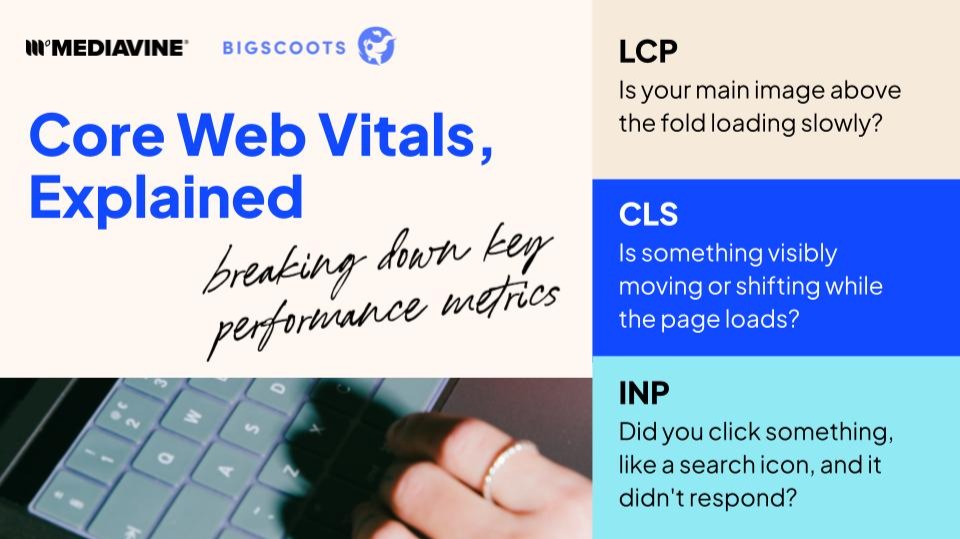
Google uses Core Web Vitals to measure real-world user experience, and they’re a factor in how your site ranks in search. The three metrics can sound technical, but they boil down to simple questions:
LCP: Is your main image loading slowly?
CLS: Is something visibly shifting while the page loads?
INP: Did you click something and it didn’t respond?
Passing Core Web Vitals isn’t the finish line. A faster, smoother site increases engagement and return visits, benefits that extend well beyond the checkmark in Search Console.
Why Your Numbers Never Match
Google Analytics, your hosting dashboard, and your Mediavine numbers probably won’t match exactly. That’s normal. Each one measures traffic differently, including how it defines sessions, filters bots, and processes the data.
Bot traffic is a big part of the difference. Automated traffic can make up a meaningful share of the requests hitting your site, while Google Analytics is designed to measure human visitors. So your GA numbers can be lower than the total traffic your server is actually handling.
The goal isn’t to find one number and call it the “true” number. It’s to understand what each tool is measuring and use the right one for the question you’re trying to answer.
For example, your analytics can help you understand your audience, while your hosting and Mediavine data can give you a better picture of everything happening on the site, including traffic that analytics doesn’t capture.
When to Consider a Migration
A few signs that your current setup may be holding your site back: Core Web Vitals are slipping, bounce rate is climbing, or your site has simply outgrown the plan you’re on.
If you do decide to migrate, the process doesn’t have to be disruptive. A good hosting partner manages the move for you, hands-on, with zero downtime for your live traffic and revenue. More on how that works below.
Pressure-Test Your Setup
Work through this before Q4 traffic tests it for you. If you answer “not sure” more than a couple times in any category, that’s your signal to act now.
Speed & Core Web Vitals
- Do you know your current LCP, CLS, and INP scores?
- Has your load time changed meaningfully in the last 6 months, and do you know why?
- When did you last audit your active plugins and theme for performance impact?
- Are you using a page builder or theme known to cause layout shift?
Traffic & Reporting
- Do your Google Analytics, hosting dashboard, and Mediavine numbers roughly agree, or is there an unexplained gap?
- Have you reviewed how much of your traffic may be bot-driven in the last 90 days?
- Do you know your site’s current uptime record?
Hosting Fit
- Has your traffic grown significantly since you last evaluated your hosting plan?
- Do you know what happens to your site’s performance during a sudden traffic spike?
- When was your last migration or infrastructure review?
Readiness for Scale
- Do you have a plan in place if traffic doubles overnight?
- Does your hosting provider know your Q4 content, campaign, and traffic plans?
- Do you know who to contact if something breaks during peak traffic?
The Hosting-Revenue Connection
Everything above traces back to one thing. Site performance comes from three layers, not just the server.
Server infrastructure is the foundation, determining whether your site has the capacity to handle a traffic spike without slowing down or competing for resources.
Network edge is how that content gets delivered. A strong content delivery setup reduces time to first byte (how long it takes your server to respond before anything even starts loading), meaning your pages start loading faster for readers no matter where they are. This directly supports stronger Core Web Vitals scores.
The application layer covers everything running on the site itself, including the theme, plugins, scripts, and ad tags. This is where many performance issues show up, and where a technical audit typically starts.
If any one of these layers is slowing things down, you can see the impact in Core Web Vitals and the user experience. For publishers, that can ultimately affect revenue too.
How BigScoots Approaches This
If you’re rethinking your setup after working through the checklist above, here’s how BigScoots specifically supports publishers through that process.
BigScoots owns 100% of its own hardware, a rare setup in an industry built on shared, leased infrastructure, and builds in extra capacity to handle traffic spikes, so your site isn’t competing with other customers for resources during a spike. On the network side, BigScoots uses Cloudflare Enterprise to cache content across 330+ global cities, helping reduce time to first byte no matter where your readers are.
Migrating to a new hosting partner doesn’t have to be scary. BigScoots handles the migration for you from start to finish, with a person managing the process rather than leaving it to an automated tool. Then, 24 to 48 hours after the move, a second team member reviews the site to ensure everything is transferred correctly. The switch is designed to happen without downtime or an interruption to your live traffic and revenue.
For enterprise sites with custom architecture, the BigScoots team provides hands-on migration support. If you’d rather manage the move yourself, there’s also a self-service migration tool available.

Hosting isn’t a decision you should make once and never revisit. Your hosting partner’s capabilities should scale and grow with your site as you build through Mediavine’s programs, from Journey through Official, Select, Signature, Premiere and Premiere Plus. BigScoots hosting is built to support that full range, from newly launched Journey sites to high-traffic Premiere Plus networks, without publishers needing to rebuild their technical foundation every time they move up a tier. At every stage, there’s no long-term lock-in: upgrade ahead of anticipated growth or seasonal spikes, and move back down when things settle.
Get Ready Now
Q3 is the window to consider whether your hosting is optimized for the busiest traffic and earnings season for many sites. Making changes now means your site is stable and proven out before the traffic and revenue of peak season arrive, not during it.
Missed the live session? Watch the full webinar replay, download the Q4 Readiness Checklist, and reach out to your Mediavine Account Manager or the BigScoots team directly if you have questions about your specific setup.
About the author

Share this page

Overline
H2 heading lorem ipsum
Lorem ipsum dolor sit amet, consectetur adipiscing elit, sed do eiusmod tempor incididunt ut labore et dolore magna aliqua. Ut enim ad minim veniam, quis nostrud exercitation.