

- Pagespeed
Improve Your Site Speed and GPSI Score
•
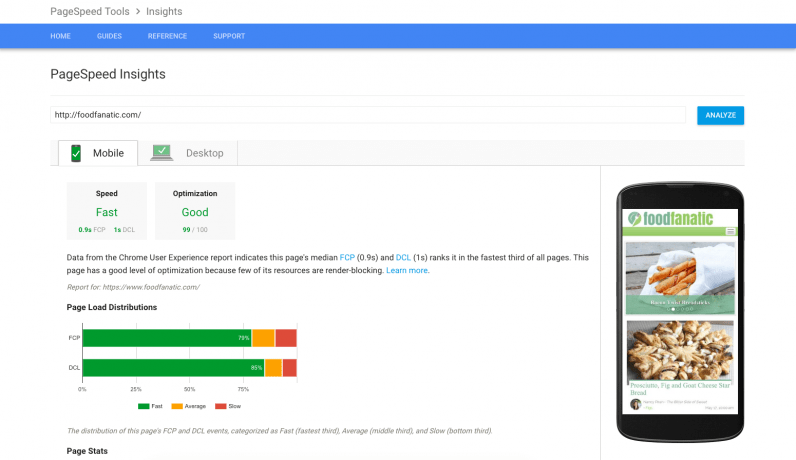
1. Optimize images
By far the biggest penalty we see is due to images that are larger than needed, whether in terms of file size or dimensions. These unoptimized images drag down both user experience and Google PageSpeed Insights (GPSI) scoring, so it’s important to know how to fix both to ensure you’re providing the best experience.Optimize image file size
In a world of 16-megapixel phone cameras, it’s easy to fall in love with super high-quality photos. The problem is that those 16-megapixel photos are enormous, and can cause your site to load slowly. What’s more, it’s unlikely you need that quality for those pictures to be beautiful. We want to find the sweet spot where we reduce file size as much as possible without reducing the beauty. Fortunately, optimizing your image file sizes is straightforward as there are a handful of good WordPress plugins that do it for you! We’ve written about this before on our own blog, and EWWW Image Optimizer, our recommendation there, continues to be a fine choice. We’ve also had great success with Imagify and ShortPixel; ultimately, these plugins do much of the same thing behind the scenes. The right choice for your site depends on the specific bells and whistles of each, or their pricing tiers. Each offers a “free” version, so it’s easy to test them out! (Note from Mediavine: We happen to have a blog post from Nicole that gives you step-by-step instructions on using ShortPixel to reduce image sizes.)

Optimize image dimensions
The second critical image optimization is to resize to the dimensions you’re displaying. Even if you’ve optimized file size using one of the plugins above, you can run afoul of Google if your images use incorrect dimensions. To demonstrate this, you’ll want to know a little about how WordPress stores images at different sizes… When you upload an image, WordPress automatically generates multiple versions, or thumbnails, at different dimensions. WordPress includes a few of these thumbnail sizes by default, but any theme or plugin can also define their own thumbnail sizes. This allows themes to use your images in a predictable way, since those images will be available at the thumbnail size the theme requests. There are times, however, when WordPress can request an image whose dimensions don’t match any of the available thumbnail sizes. (This happens most commonly when a post editor inserts an image and drags it to a different size.) In these cases, the web server has to deliver the full-size image, which is often much larger, and instruct the browser to resize it according to the desired dimensions. This means longer load times for your users and, subsequently, a massive penalty in your GPSI score. There are two ways to address these image dimensions mismatches:- Be consistent. If you have a thumbnail defined for 450×450, make sure your design doesn’t use 425×425. Or if you must use 425×425, define it as one of your custom thumbnail sizes!
- If you need to resize an image in your post, after you do so, click the image and click the “Edit” pencil. Note the image’s Custom Size, and click Edit Original. In the top right, enter the dimensions from the Custom Size and click Scale.
2. Eliminate render-blocking Javascript and CSS
“Render-blocking” refers to Javascript and CSS assets that must fully load (i.e., in the HEAD section of your pages) before your readers can see your post. In the majority of cases, those assets can and should be loaded after the page content. Google always prefers that the actual content be loaded as early and as fast as possible. We’ve written about this before as well (both from the Javascript and CSS perspectives) and our recommendation to use Autoptimize still stands. As before, we recommend caution—Autoptimize can break some functionality of your site! However, it’s usually easy to fix either by disabling just the Javascript functionality, by targeting specific Javascript (e.g., jQuery) for exclusion, or if all else fails disabling Autoptimize entirely. The benefit of using Autoptimize can range from three to ten points on your GPSI score, so it’s worth giving it a try!3. Get your hosting in good shape
The last common problem is a bit of a “grab bag:” your hosting. We saw all sorts of hosting problems during our health checks: not configuring browser caching; using older, slower versions of PHP; not fully utilizing page caching; allowing unrelated site traffic to impact yours, and more. Any good host will be able to help you get the most bang for your buck, so check with them to see how they can improve your site health and performance.One final note
You may have noticed from some of the links that we wrote about most of this stuff two years ago in our own Agathon “Three Ways to Speed Up Your Site” series. This is not to say we’re ahead of the curve, but rather that “there is nothing new under the sun.” The same techniques to improve your site speed and GPSI score then, still work to improve your site speed and GPSI score now. This should be encouragement that the optimization work you invest now will pay dividends for months and years to come!What’s next?
By addressing the problems above, we frequently see a jump in GPSI score of up to 20 points. Those three updates often propel a site’s GPSI score above 85, the magic number in many analysts’ eyes. If you’re looking to maximize ad revenue or PageRank, or offer your readers a better experience, please draw on our experience doing site health assessments and walk through the recommendations. (Note from Mediavine: You might’ve noticed that, like Agathon, we’re also pretty obsessed with site speed and have shared far more than our 2 cents about it since we started in the full-service ad management business. We even built our ad tech with site speed at the forefront. Our CEO Eric talked site speed at the first Mediavine Publishers Conference, which you can read about here. Or watch the session on our YouTube channel.) Peter Green is the Owner and CTO of Agathon, a company that specializes in building and hosting web applications.
About the author

Share this page