

- Advertising
Lazy Loading Ads: Why Mediavine Ads Load 200% Faster
•

Over 200% Faster Initial Ad Load Times!
When we measure page speed, we focus on initial critical path rendering, or how quickly the first screen view can load. Why? Because that’s what users notice first and that’s why companies like Google recommend you focus on speeding up that experience. Once your first screen view is loaded, the rest of the site has time to load before the user even scrolls and notices. It makes for the fastest-feeling experience, which is what matters most to readers. So how are we claiming a 200% speed increase? It’s actually sometimes even faster than that; Mediavine sites typically load just 1-2 ads during that initial screen view because that’s all we need, thanks to lazy loading the rest of the ads. Most of the web, including sites managed by our main competitors, are loading 4-5 or sometimes even 8+ ads. When you compare that in actual load times, most Mediavine ads will load in a second, while competitors can take upwards of 8+ seconds. That 200% is actually a conservative estimate. But don’t take our word for it! We’re going to teach you how to measure ad load speed yourself and let you watch lazy loading in action. We’ll do this with a tool built into any site using Google’s ad server, Doubleclick for Publishers (DFP), which almost every site is.
Google Publisher Console
The tool we’re focusing on is the Google Publisher Console. This is a debug tool that will show you all communication between a site and the ad server. It’s incredibly easy to load. You can append the query string ?googfc to any site you visit. For example, if we’re checking out the latest post on one of our publishers, My Baking Addiction, we’d change the URL to:http://www.mybakingaddiction.com/caramel-coconut-chocolate-chip-cookies/?googfcYou should see a box overlaying the bottom third or so of your site. It looks like this:
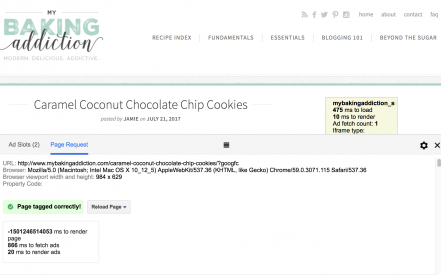 The initial tab, Ad Slots, has some great debug info that we use as your ad management company, but for the purposes of this blog post, we’re going to skip it and click on the Page Request tab to mimic the screenshot above.
There’s two great things to note here. The first is actually visible in the link to that tab we just left. In parentheses next to the word ad slots, you should see how many ads were loaded.
In our screenshot we had two – our sidebar unit and the desktop adhesion.
We’ll come back to this when we do our comparison, but this is how you can measure how many ads are loading in the screenview you have open. If you were resize the window to be really big so that it included an in-content ad, you may see three for a Mediavine site. However, for the most part, you should see 1-2 in the number of ads loaded when you first visit a Mediavine site.
Now on to the Page Request tab. In here the important number we’re focusing on is time measurement in milliseconds to fetch ads. In the screenshot we’ve highlighted, you’ll see that number is 866 ms, or 0.866 seconds. AKA less than a second.
While this is a particularly awesome score, sometimes Mediavine ads can take 1-2 seconds, so you may want to refresh a few times to get a sense of how long it takes in the real world.
If you were to scroll down the page, you would see lazy loading ads in action in the console. The number in parentheses next to ad slots would count up and the time to fetch ads would increase.
However, the important time to fetch ads to use in comparisons is the one to care most about: How we impacted your initial screen view loading, and that’s from the initial fetch ad measurement.
The important things to note when we take this to compare: When the page first loaded, Mediavine ads loaded in under a second and only 2 ads loaded.
Now let’s head to a non-Mediavine site. (Ugh, we know. The worst. Take one for the team here.)
Here’s a screenshot from a competitor claiming to have ad technology that loads ads faster:
The initial tab, Ad Slots, has some great debug info that we use as your ad management company, but for the purposes of this blog post, we’re going to skip it and click on the Page Request tab to mimic the screenshot above.
There’s two great things to note here. The first is actually visible in the link to that tab we just left. In parentheses next to the word ad slots, you should see how many ads were loaded.
In our screenshot we had two – our sidebar unit and the desktop adhesion.
We’ll come back to this when we do our comparison, but this is how you can measure how many ads are loading in the screenview you have open. If you were resize the window to be really big so that it included an in-content ad, you may see three for a Mediavine site. However, for the most part, you should see 1-2 in the number of ads loaded when you first visit a Mediavine site.
Now on to the Page Request tab. In here the important number we’re focusing on is time measurement in milliseconds to fetch ads. In the screenshot we’ve highlighted, you’ll see that number is 866 ms, or 0.866 seconds. AKA less than a second.
While this is a particularly awesome score, sometimes Mediavine ads can take 1-2 seconds, so you may want to refresh a few times to get a sense of how long it takes in the real world.
If you were to scroll down the page, you would see lazy loading ads in action in the console. The number in parentheses next to ad slots would count up and the time to fetch ads would increase.
However, the important time to fetch ads to use in comparisons is the one to care most about: How we impacted your initial screen view loading, and that’s from the initial fetch ad measurement.
The important things to note when we take this to compare: When the page first loaded, Mediavine ads loaded in under a second and only 2 ads loaded.
Now let’s head to a non-Mediavine site. (Ugh, we know. The worst. Take one for the team here.)
Here’s a screenshot from a competitor claiming to have ad technology that loads ads faster:
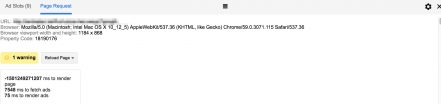 We blurred out the URL to protect the innocent publisher in this one. However, you can quickly see that this competitor loads 9 ads on page load and those ads took 7542 ms to load.
You can see now why we lazy load. We were able to load 25% of the number of ads and have our ads load 900% faster than this competitor (we told you the 200% was conservative). To be fair, not every network runs 9 ads on a page, so our numbers are an average.
Again, we’d recommend going through a few sites, not just your own, when considering ad management companies and measuring these speeds. Don’t fall for gimmicky names of products that make ads sound fast when you can actually measure them yourself!
Here are a few that we found while browsing:
We blurred out the URL to protect the innocent publisher in this one. However, you can quickly see that this competitor loads 9 ads on page load and those ads took 7542 ms to load.
You can see now why we lazy load. We were able to load 25% of the number of ads and have our ads load 900% faster than this competitor (we told you the 200% was conservative). To be fair, not every network runs 9 ads on a page, so our numbers are an average.
Again, we’d recommend going through a few sites, not just your own, when considering ad management companies and measuring these speeds. Don’t fall for gimmicky names of products that make ads sound fast when you can actually measure them yourself!
Here are a few that we found while browsing:
| Competitor | Ad Slots | Time to fetch (ms) |
|---|---|---|
| Competitor A | 9 | 9000ms-13000ms |
| Competitor B | 8 | 5000ms-6000ms |
| Competitor C | 6 | 2500ms-6000ms |
Pros:
- Insane initial page speed increase. Google and your users will love you for it.
- Higher viewability for lazy loaded ads. This stops you from loading ads that a user may never see.
- Higher viewability for above the fold / initial ads. A web browser can only load so many things at once, and this lets your computer focus on loading the initial ads before the ads further down the page, making them more likely to load before a user scrolls past them.
Cons:
- Difficult to implement and test. There’s a lot of factors at play, and will likely involve some major code rewrite and testing of various lazy loading offsets.
- From a monetary standpoint, this may reduce short term revenue or perceived Page RPM. There are likely below the fold ads that users will never scroll to that are loaded without lazy loading. These ads may have terrible viewability and hurt your website long term, but in the short term, unseen ads still pay something.
- Complications and conflicts. Like any code or feature, it can lead to more potential conflicts. If a publisher is both lazy loading images and ads for example, the browser will try to load both simultaneously, which could lead to unseen ads and lower viewability.
So how do you implement this?
Google has a great example on how to implement them in their viewability best practices article, or … Shameless Plug Alert: You can always sign up with Mediavine. We’ve had these since our launch and they’ve been thoroughly tested, vetted and are ready to go for your site.About the author

Share this page