

- Create
Amazon Affiliate Updates to Create
•
 What does this mean for you?
Well, in order for you to take advantage of these features, you will need to get Amazon Products API tokens. We have a detailed help document to help you find your Amazon Products API tokens, but here is the gist below:
In order to qualify for Amazon Products API Tokens, there are some specific requirements, and you can learn about those and obtain your tokens here: https://affiliate-program.amazon.com/assoc_credentials/home
Once you have your tokens you will have to add them to your Create Settings.
First, if you haven’t already, take a moment to register Create so you can get access to Affiliate Support.
Then visit the Affiliates Tab in Create Settings. Here is where you will be able to enable Amazon Affiliates.
What does this mean for you?
Well, in order for you to take advantage of these features, you will need to get Amazon Products API tokens. We have a detailed help document to help you find your Amazon Products API tokens, but here is the gist below:
In order to qualify for Amazon Products API Tokens, there are some specific requirements, and you can learn about those and obtain your tokens here: https://affiliate-program.amazon.com/assoc_credentials/home
Once you have your tokens you will have to add them to your Create Settings.
First, if you haven’t already, take a moment to register Create so you can get access to Affiliate Support.
Then visit the Affiliates Tab in Create Settings. Here is where you will be able to enable Amazon Affiliates.
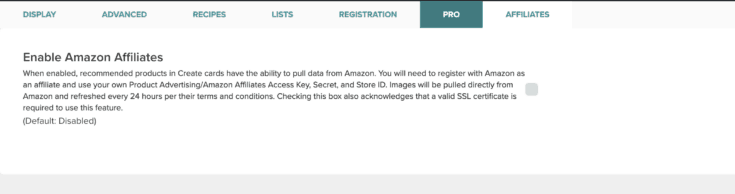 Once you’ve enabled Amazon Affiliates, you’ll have access to the API Token Fields.
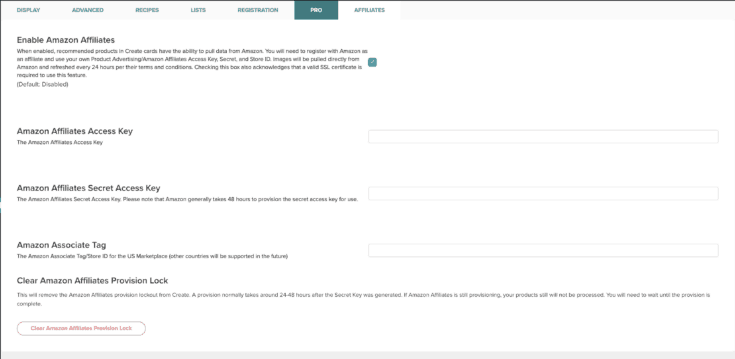 Add your Access Key, your Secret Access Key and your Associate Tag.
Be aware that Amazon takes its time to provision API access, typically between 24 and 48 hours. Create will lock you out of using the Amazon Affiliates keys for 48 hours by default.
If you’ve used your tokens before, and are sure they are ready to go, you can opt to clear our Provision lock using the button in the bottom of the settings.
Now that your tokens are added and you’ve waited the required 2 days, it’s time to start populating your recommended products.
The next time you add an Amazon Affiliate link to a Create card in the “Recommended Products” section or a List, paste your affiliate URL and the product image and title will populate.
As always, our support team is here to help if you have any questions. Please reach out to create@mediavine.com.
Add your Access Key, your Secret Access Key and your Associate Tag.
Be aware that Amazon takes its time to provision API access, typically between 24 and 48 hours. Create will lock you out of using the Amazon Affiliates keys for 48 hours by default.
If you’ve used your tokens before, and are sure they are ready to go, you can opt to clear our Provision lock using the button in the bottom of the settings.
Now that your tokens are added and you’ve waited the required 2 days, it’s time to start populating your recommended products.
The next time you add an Amazon Affiliate link to a Create card in the “Recommended Products” section or a List, paste your affiliate URL and the product image and title will populate.
As always, our support team is here to help if you have any questions. Please reach out to create@mediavine.com. About the author

Share this page