

- Advertising
Mediavine In-Content Ad Settings: How to Self-Audit For Best Results
•

Making Mediavine In-Content Settings Work For You
Start by opening up your Mediavine Dashboard and making your way to Settings, followed by the In-Content Ads tab: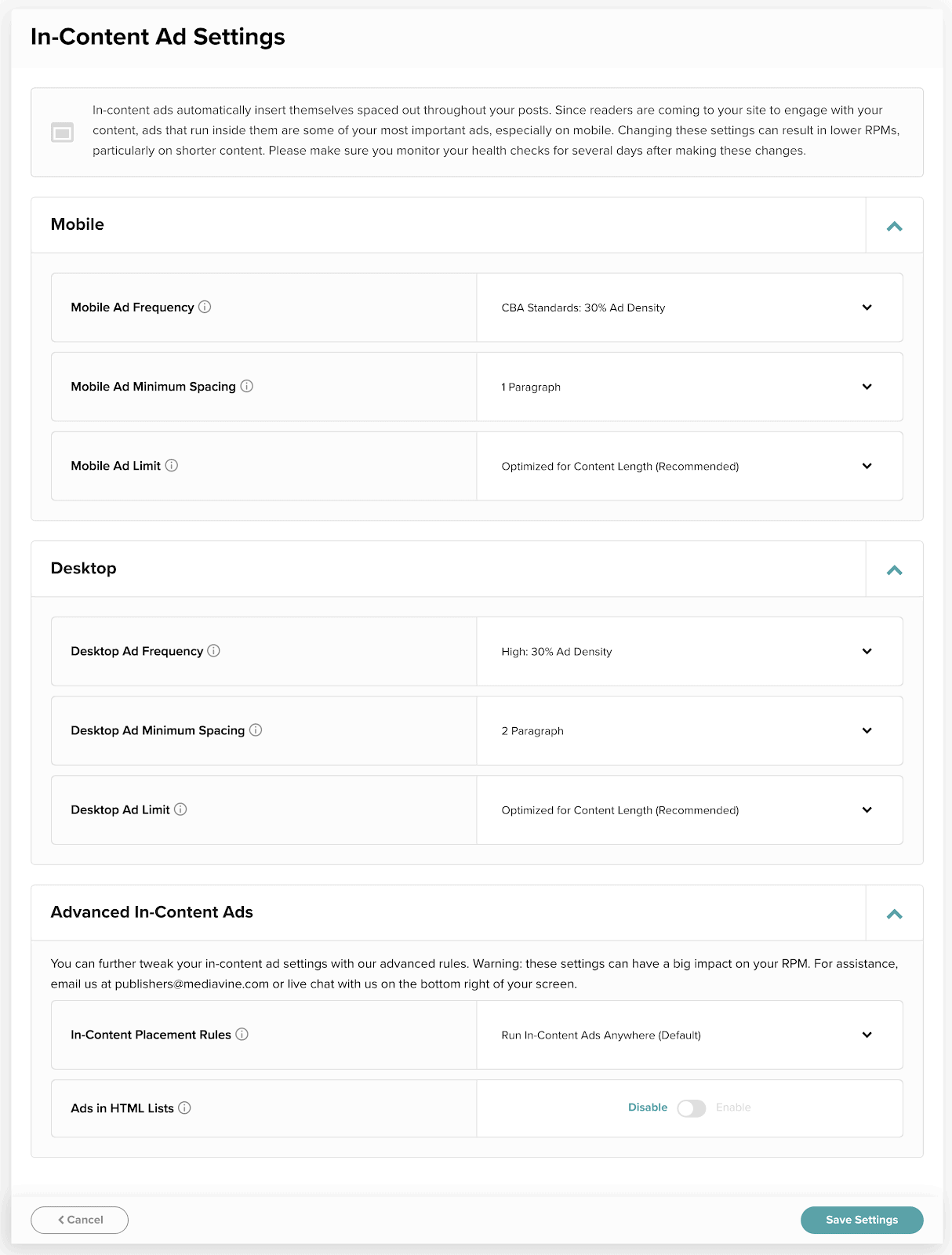 Everyone begins with the same default settings, which we’ve found perform well on most sites. There’s room in both directions to tweak your ad setup, though, so let’s cover what the settings are and what they mean.
First, we have separate controls for density and spacing for ads on mobile and desktop.
This is important because your content looks much different on mobile and desktop, and readers behave differently as a result. This is why the goals for each device type are separate on your Dashboard’s health check.
Make sure you know what you’re changing and why, and check posts after you make changes to see the impact. You can test your posts using an incognito or private window, and the ?test=houseads query at the end of the url.
Don’t forget that part, it is important!
Everyone begins with the same default settings, which we’ve found perform well on most sites. There’s room in both directions to tweak your ad setup, though, so let’s cover what the settings are and what they mean.
First, we have separate controls for density and spacing for ads on mobile and desktop.
This is important because your content looks much different on mobile and desktop, and readers behave differently as a result. This is why the goals for each device type are separate on your Dashboard’s health check.
Make sure you know what you’re changing and why, and check posts after you make changes to see the impact. You can test your posts using an incognito or private window, and the ?test=houseads query at the end of the url.
Don’t forget that part, it is important!

Ad Frequency
Also called ad density, ad frequency is the percentage, in relation to content, of ads allowed to run on your site. This takes into account the user’s screen size and device type, as well as your actual content length, including images.- For mobile, you can choose from 30% density down to 20% (in increments of 2%).
- For desktop, you can select from 30% density to as low as 10% (in 5% increments).
- Our default is 28% for mobile, and 20% for desktop.
Ad Spacing
If you aren’t familiar with ad spacing, it’s what it sounds like. We measure spacing as the minimum number of paragraphs that must appear between two in-content ads. The default is 2, on both mobile and desktop, and typically works pretty well for most sites’ content. There are some outliers, however, and occasions where you might want to consider adjusting. Such as: If you write very long sentences or paragraphs … If you get a little wordy, like I do, you may want to consider lowering paragraph down to 1. Content with long paragraphs that are more than 1-2 sentences long have a harder time reaching their monetization potential. The best practice for ad revenue and readability is still going to be to manually edit those posts and add in more hard returns, but adjusting your spacing setting can sometimes give you a bump in the meantime. … or if you write very short sentences with lots of returns.
Alternatively, some sites rely on short sentences.
With a hard return between each one.
Kind of like this one, actually.
See what we did there?
Unfunny blogger jokes aside, if your writing is anything like this, you’ll want to leave the paragraph setting at 2. If you still find the ads to be too smooshed together, you can increase it to 3, but watch your performance and site health checks carefully.
These are “global changes” — if one of your posts is written in super short fragments for effect, while the rest feature mostly normal-length sentences, altering the formatting may actually hurt the majority of your content.
… or if you write very short sentences with lots of returns.
Alternatively, some sites rely on short sentences.
With a hard return between each one.
Kind of like this one, actually.
See what we did there?
Unfunny blogger jokes aside, if your writing is anything like this, you’ll want to leave the paragraph setting at 2. If you still find the ads to be too smooshed together, you can increase it to 3, but watch your performance and site health checks carefully.
These are “global changes” — if one of your posts is written in super short fragments for effect, while the rest feature mostly normal-length sentences, altering the formatting may actually hurt the majority of your content.
Ad Limits
If you write SUPER long-form content, this section is for you. For a long time when a new site launched, the standard Mediavine ad limits were set at 12 for mobile and 9 on desktop. Those are reasonable numbers; very few bloggers are writing content long enough to even hit those limits. But if you’re one of those few, this is a setting you may want to consider adjusting. You might think that running 12-plus ads in one post sounds extreme, but think of it this way: When you’re on Facebook scrolling for a while, are you counting the ads? What about Instagram? Do you notice that if you scroll long enough, or hit a certain of number of ads, they stop? Spoiler alert, they don’t. Double spoiler alert, the only people counting ads are other bloggers or other ad companies trying to generate business with misleading information. In addition to the frequency settings described above which limit the ratio of ads to content to preserve user experience, Mediavine ads are the fastest in the industry. We lazy load ads, so if a user doesn’t scroll near them, they don’t even appear. Here’s a secret …
With Mediavine, site speed has nothing to do with the total number of ads on a page. Repeat: Counting ads is irrelevant. The total number does not impact the overall speed or load time, thanks to lazy loading and the optimized code of our script wrapper.
Here’s another secret …
Mediavine ads operate well within all given ad policy, and our partners — Google (we’re Google Certified Publishing Partners), Sovrn, Pubmatic, Appnexus, OpenX, Yieldmo, Rubicon, etc. — are by and large the same ones other ad management companies work with.
Basically, everyone you see running on the Ads.txt file on any given site (accessible by adding /ads.txt to the end of a domain. Check it out.) Same ones. If someone is telling you to adjust your ad settings so that one of them will approve you? That’s not the case.
Chances are that you are already approved and running those ads, and if not, this isn’t due to your Mediavine ad implementation. We work directly with each partner on your behalf to get you approved with as many as possible.
As your ad management providers, we take care of the relationships with these large ad buyers who don’t work with individual sites and ensure that your inventory is accessible, available and attractive in real-time auctions.
We also have a whole team devoted to making sure you aren’t leaving any revenue on the table due to missing ad units, under-performing ad units, theme changes, site downtime, script issues and countless other issues.
Our team is there to make sure you get the most out of what you’ve got, and as we’ve discussed at length here, we also put you in command. Regardless of the changes you make, you will be compliant from any policy perspective.
A quick real-life example
To illustrate this, check out the dashboard of one blogger in the travel space who attended a Lunch and Learn in Minnesota this spring. After changing their ad limits from a numbered limit to “Optimized for Content Length”, and adjusting their ad density to the maximum, this happened:
Here’s a secret …
With Mediavine, site speed has nothing to do with the total number of ads on a page. Repeat: Counting ads is irrelevant. The total number does not impact the overall speed or load time, thanks to lazy loading and the optimized code of our script wrapper.
Here’s another secret …
Mediavine ads operate well within all given ad policy, and our partners — Google (we’re Google Certified Publishing Partners), Sovrn, Pubmatic, Appnexus, OpenX, Yieldmo, Rubicon, etc. — are by and large the same ones other ad management companies work with.
Basically, everyone you see running on the Ads.txt file on any given site (accessible by adding /ads.txt to the end of a domain. Check it out.) Same ones. If someone is telling you to adjust your ad settings so that one of them will approve you? That’s not the case.
Chances are that you are already approved and running those ads, and if not, this isn’t due to your Mediavine ad implementation. We work directly with each partner on your behalf to get you approved with as many as possible.
As your ad management providers, we take care of the relationships with these large ad buyers who don’t work with individual sites and ensure that your inventory is accessible, available and attractive in real-time auctions.
We also have a whole team devoted to making sure you aren’t leaving any revenue on the table due to missing ad units, under-performing ad units, theme changes, site downtime, script issues and countless other issues.
Our team is there to make sure you get the most out of what you’ve got, and as we’ve discussed at length here, we also put you in command. Regardless of the changes you make, you will be compliant from any policy perspective.
A quick real-life example
To illustrate this, check out the dashboard of one blogger in the travel space who attended a Lunch and Learn in Minnesota this spring. After changing their ad limits from a numbered limit to “Optimized for Content Length”, and adjusting their ad density to the maximum, this happened:
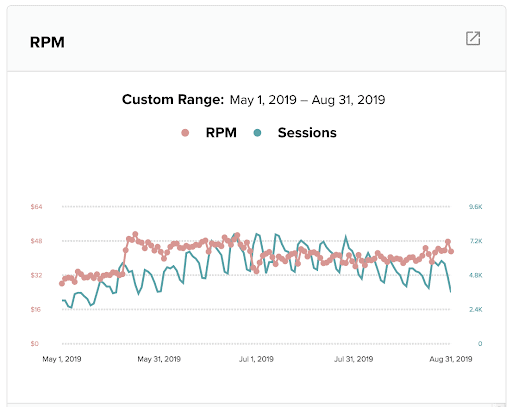 You can see that the RPM jump was significant. Seasonality will play a role (you can see it in the blue line dipping at the end of June), but the overall RPM has stayed consistently, significantly higher since the changes were made.
This is not possible for everyone — this particular site is known for hugely long content — but as a demonstration of the impact these ad settings can have under certain circumstances, and when used in tandem, it’s worth sharing!
You can see that the RPM jump was significant. Seasonality will play a role (you can see it in the blue line dipping at the end of June), but the overall RPM has stayed consistently, significantly higher since the changes were made.
This is not possible for everyone — this particular site is known for hugely long content — but as a demonstration of the impact these ad settings can have under certain circumstances, and when used in tandem, it’s worth sharing! About the author

Share this page