

- Traffic Growth
Mediavine Content Upgrade Challenge | Part 1: Finding Your Top Posts
•

Take the Mediavine Content Upgrade Challenge
In the fall of 2018, we launched the Mediavine Content Upgrade Challenge to help you get ready for Q4 — or really, ANY quarter. This challenge helps you get your content ready for each season, because of how ad revenue fluctuates throughout the year. It’s designed as a 3-part challenge with a blog post tutorial and worksheets for each section. Here’s a quick breakdown about the challenge:- Part 1: The post you’re reading right now — It’s all about identifying your top-performing posts that you will optimize in this Challenge.
- Part 2: Optimizing Your Posts — Learn where to optimize in your top-performing posts to boost SEO and ad performance.
- Part 3: Sharing Your Work and Tracking Your Growth — Get your work out there and keep up with your growth.
- See what’s new for the Content Upgrade Challenge in 2020!
- Worksheets: Scroll to the bottom of any of the posts for paper or digital worksheets — your choice.
 Before we do anything else, I want to make sure you’ve read and implemented our CEO Eric Hochberger’s font size and line height recommendations site-wide. They are super important for user experience AND your ads!
In fact, he has a whole blog post series on increasing RPM that is a deep dive into all the things you can do to increase your ad earnings.
Now that you’ve made those changes for your site, we’re going to dig into the data to help you narrow down the posts you should focus on for optimization. Some of this is educated guessing — we’re going to assume that if a post was seeing traffic last October, November or December, it will hopefully do so this October, November and December (AKA Q4).
Same goes for any other quarter — just look at last year’s traffic!
Before we do anything else, I want to make sure you’ve read and implemented our CEO Eric Hochberger’s font size and line height recommendations site-wide. They are super important for user experience AND your ads!
In fact, he has a whole blog post series on increasing RPM that is a deep dive into all the things you can do to increase your ad earnings.
Now that you’ve made those changes for your site, we’re going to dig into the data to help you narrow down the posts you should focus on for optimization. Some of this is educated guessing — we’re going to assume that if a post was seeing traffic last October, November or December, it will hopefully do so this October, November and December (AKA Q4).
Same goes for any other quarter — just look at last year’s traffic!
1. Look at page-level data in the Mediavine Dashboard
Now that we have page-level data in the Mediavine Dashboard, you can use it for all kinds of things. We like to look at your top pages’ ad impressions. There’s a brand new worksheet in our workbook where you can write down a list of these posts to focus on. Here’s how to find them: 1. Set the date range 2. Sort by top pages (default) 3. Sort by “impressions”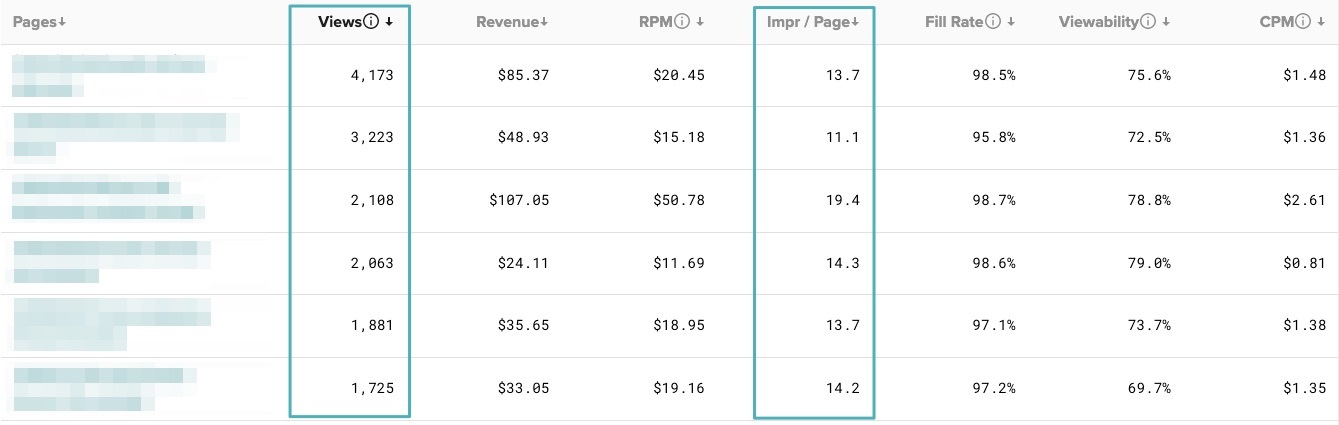 We want to focus on the posts that are getting the least impressions so we can see how to improve them.
In the above example, that would be the post getting 11.1 impressions per page and the two getting 13.7. The 19.4 post is doing really well, so we could also take a look at that one and see what we can do to make the others do just as well. (Your numbers might look different, and that’s OK!)
(Note: Page-level data in the Mediavine Dashboard only goes back to January 2020, but it can still help you see how your top posts are performing now or recently. Next year it will be handy for looking back on this Q4!)
We want to focus on the posts that are getting the least impressions so we can see how to improve them.
In the above example, that would be the post getting 11.1 impressions per page and the two getting 13.7. The 19.4 post is doing really well, so we could also take a look at that one and see what we can do to make the others do just as well. (Your numbers might look different, and that’s OK!)
(Note: Page-level data in the Mediavine Dashboard only goes back to January 2020, but it can still help you see how your top posts are performing now or recently. Next year it will be handy for looking back on this Q4!)
2. Find your top posts in a Google Analytics report
We’ve created a Google Analytics report to help you narrow things down. Concentrate on your top 10-15 posts, keeping in mind that new content you create should be made with optimization in mind, and then if anything goes viral, you are SET.To use this report:
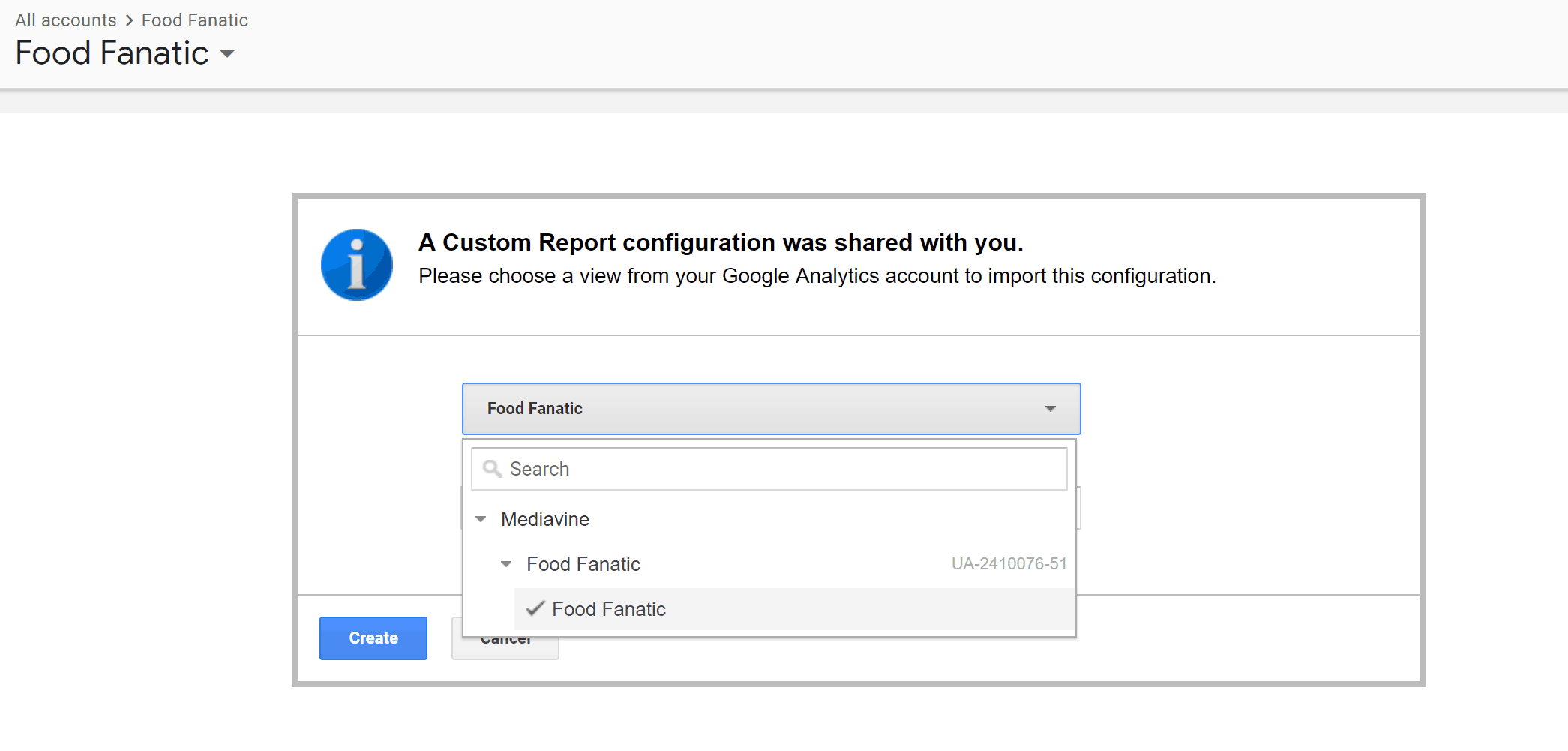
1. Log into your Google Analytics account. Please make sure you’re signing into the base account that’s set as administrator for the Google Analytics you want to access. NOTE: You may need to log out of all other Google accounts. You may also need to try in multiple browsers — we have had the best luck with Google Chrome. 2. Now navigate to this URL. 3. Click the “Import” button. If you do not see the below dialogue, move on to Step 4.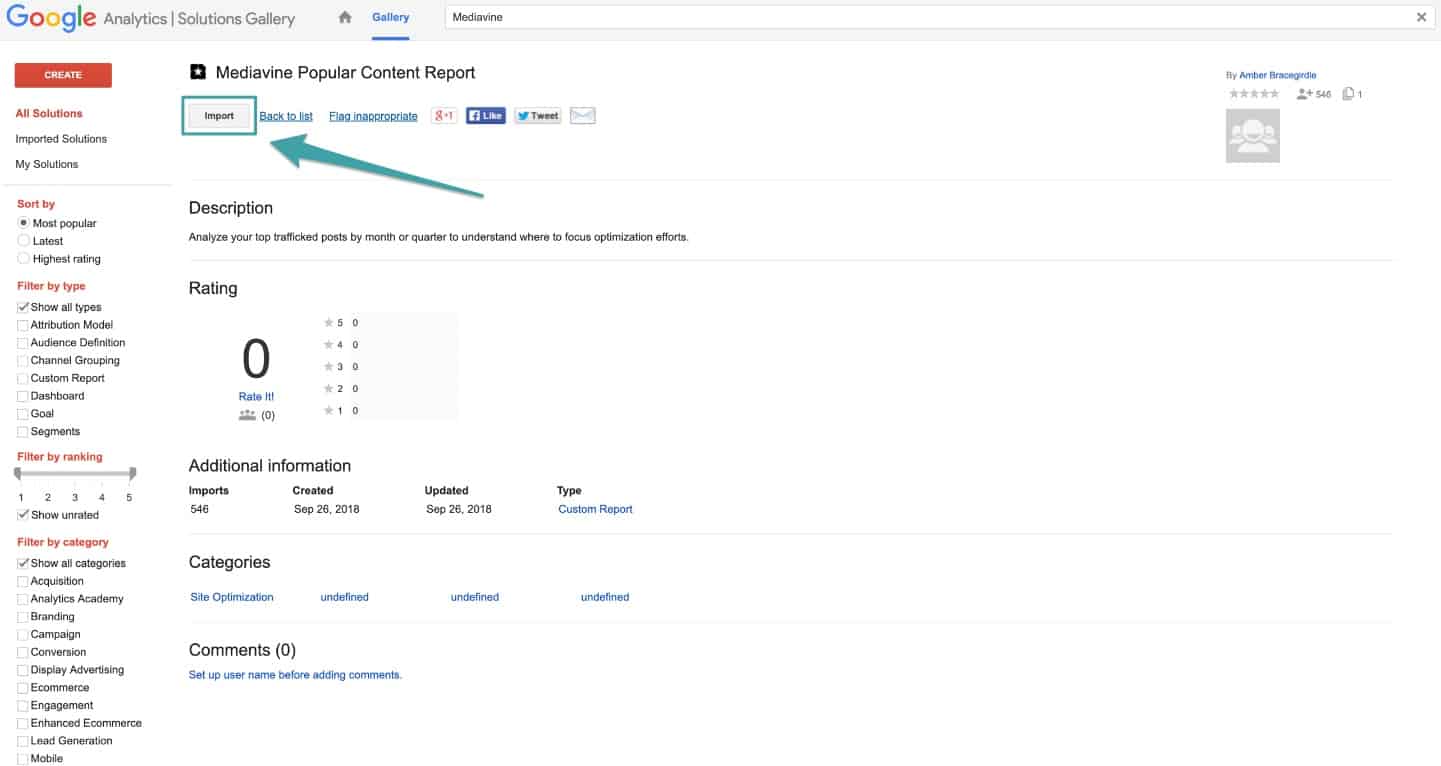 4. The next screen will ask you to “Select A View” — choose your website and click the blue button labeled “Create.”
 5. Set the date range to each month of the quarter you are after. In this example, we’re looking at last Q4, so we will start with October. Set the dates to Oct. 1–31 of last year and click “Apply.”
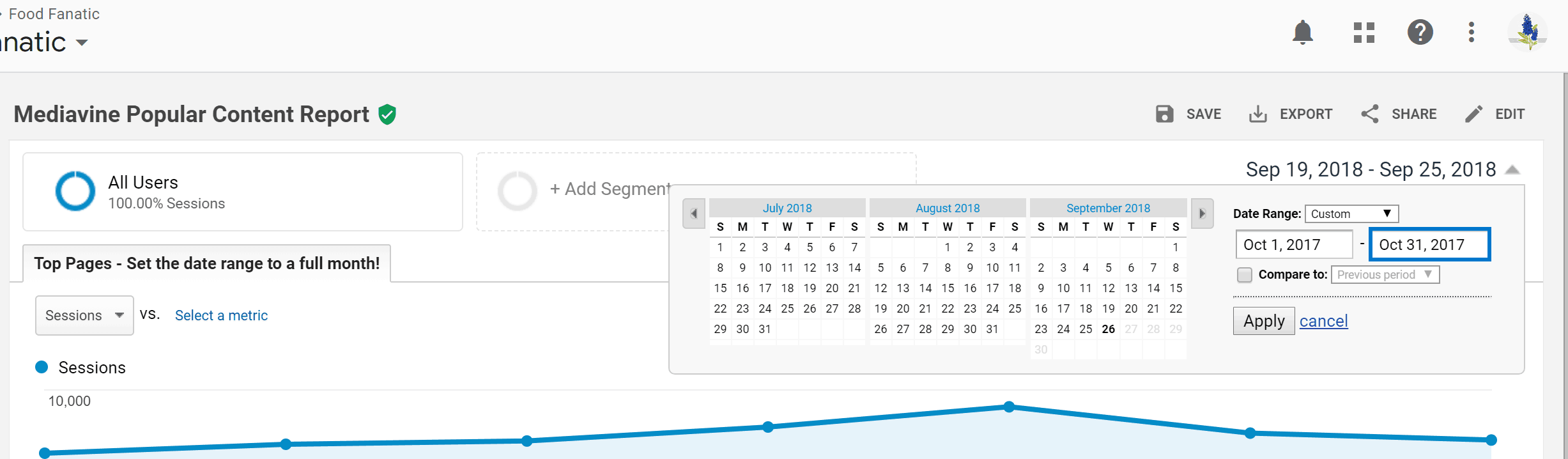 6. The resulting report will be your top posts for all of October of last year.
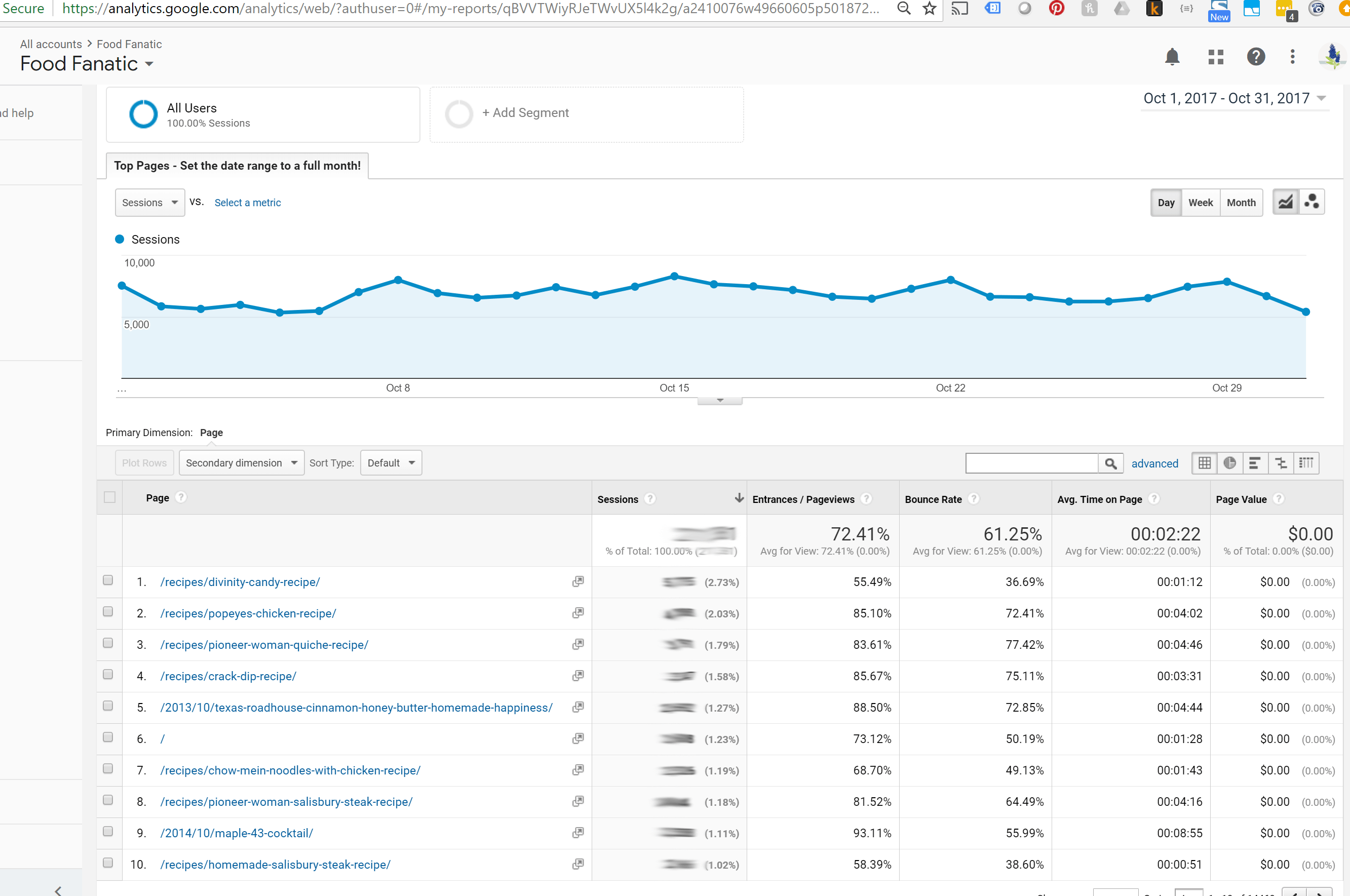 7. Print out the PDFs or email them to yourself, or just save them to your reports here in Google Analytics. Wherever it makes the most sense for you to be able to access the information as we move into the next part of the challenge.
8. Repeat this process for November and December of last year, too (or whatever months you’re diving into).
7. Print out the PDFs or email them to yourself, or just save them to your reports here in Google Analytics. Wherever it makes the most sense for you to be able to access the information as we move into the next part of the challenge.
8. Repeat this process for November and December of last year, too (or whatever months you’re diving into).
 Now that you’ve got your reports, you’re ready to optimize your top posts for each month of that quarter.
More money in your pocket is our entire goal here — well, that, and making your content better for the long haul. So if this same content sees traffic again next year, you are completely ready.
We recommend taking the Mediavine Content Upgrade Challenge at the start of EVERY quarter. There’s money to be made in every quarter of the year, not just Q4.
Now that you’ve got your reports, you’re ready to optimize your top posts for each month of that quarter.
More money in your pocket is our entire goal here — well, that, and making your content better for the long haul. So if this same content sees traffic again next year, you are completely ready.
We recommend taking the Mediavine Content Upgrade Challenge at the start of EVERY quarter. There’s money to be made in every quarter of the year, not just Q4.
Now let’s get into the goodies!
Worksheets
We have prepared two sets of worksheets for you. They are virtually the same, but one is in Google Sheets for the digital record-keepers, and the other is a fillable PDF download for you paper pundits. Start out with the Site Checklist and Google Analytics Audit and move at your own pace from there.Facebook Group
Lastly, we have a Facebook group for anyone going through the Mediavine Content Upgrade Challenge and are looking for a place to ask questions and find encouragement and support. Any content creators focused on optimization are free to join!About the author

Share this page